
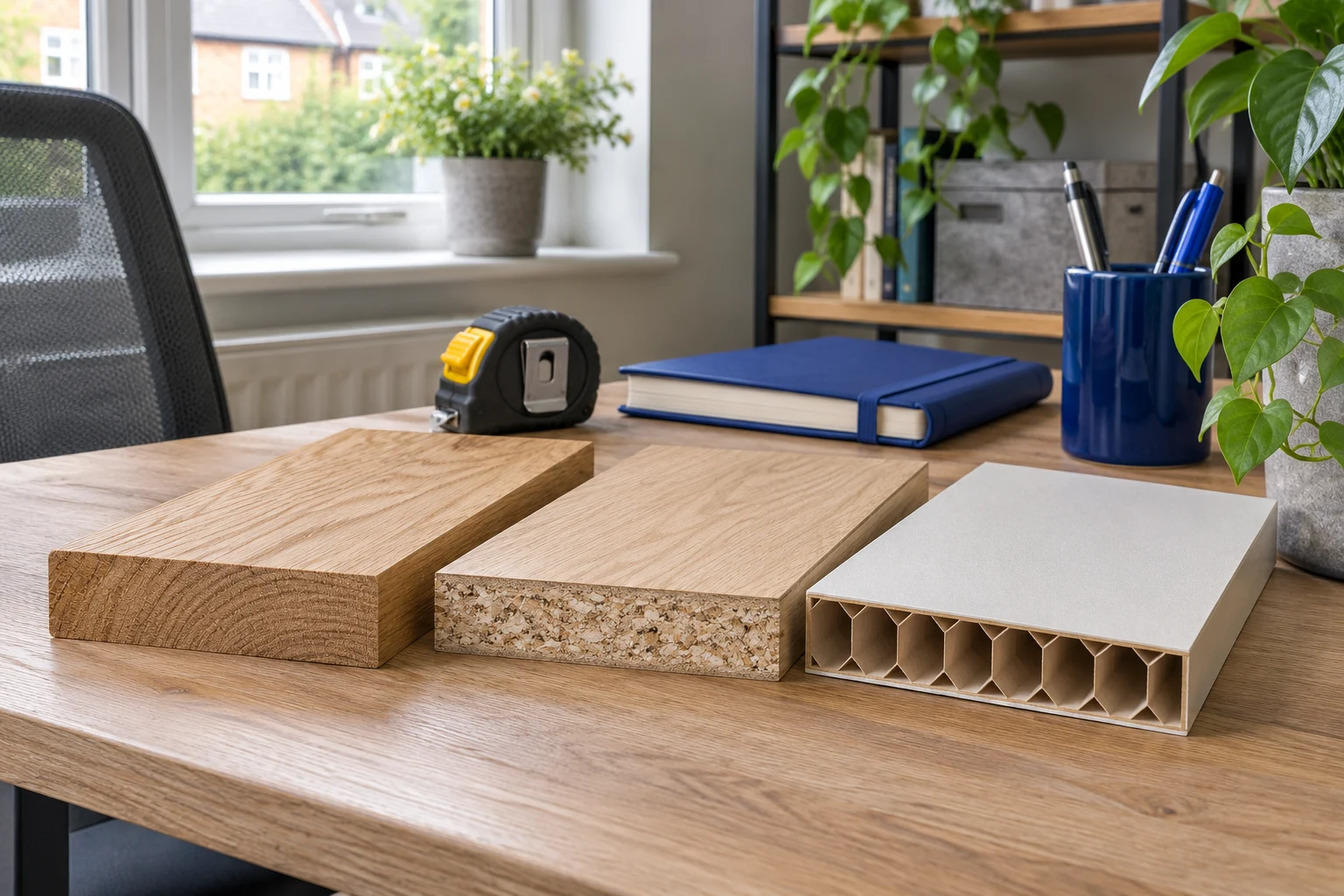
Find the exact desk and top specification
A wood-effect finish does not tell you what is inside a desktop. A thick edge can conceal a hollow core, while a thin veneer can cover a dense manufactured panel. Find the furniture model, assembly instructions and material specification before choosing an attachment.
Check whether the top is original to the frame. A replacement worktop or a desk assembled from separate components may have different requirements from the furniture shown in a product listing. Note the support positions and the intended mounting area as well as the panel material.
Look for explicit guidance about monitor arms, clamps, drilling and concentrated loads. If it is absent, ask the furniture maker about the exact arm, complete screen load and proposed position. “Maximum load 50 kg”, for example, does not by itself describe what can be applied through one small clamp at the rear edge.
What different desktop constructions change
Scroll across to compare every column.
| Construction | What to establish | Avoid assuming |
|---|---|---|
| Solid timber | Sound condition, thickness, support and approved fixing location | That every species, joint or edge can take any clamp |
| MDF or particleboard | Exact panel specification, condition and furniture-maker approval | That thickness alone prevents crushing or damage |
| Hollow or honeycomb core | Internal structure and explicit attachment guidance | That a thick-looking edge means solid material throughout |
| Glass | A mounting system specifically approved for the exact top | That a standard clamp becomes suitable with a generic plate |
| Unknown or mixed construction | A confirmed specification before attaching or drilling | That the surface finish identifies the load-bearing core |
Solid wood still needs a sound fixing area
Solid timber may be a permitted surface for a particular mount, but inspect the actual location. A split, loose joint, damaged edge or narrow unsupported overhang changes the situation. The upper base and lower jaw need full contact where the instructions require it, with the top supported as its maker intends.
Manufactured panels need specific approval
MDF and particleboard vary in construction, thickness and condition. Damage, moisture swelling or an existing indentation can reduce confidence in an attachment area. Do not apply a rule from one branded desk or top to all panels with the same general material name.
The Duronic DM12X1 illustrates why the mount’s own instructions matter as well as the desk’s. Its fitting guidance calls for solid wood and rules out thin MDF. An attractive thickness match on another panel does not override that stated requirement.
The short upright
Duronic DM12X1
A short upright puts the VESA plate close to the base and does away with a long swinging elbow. Choose it for one screen that normally stays in the same place.
The head tilts and its height can be set by hand while supporting the screen. Check the height you need and ask Duronic to confirm clamp fit on your measured edge. Duronic calls for a solid wood top and rules out thin MDF.
- 17–30″
- Up to 8 kg
- VESA 75 × 75 or 100 × 100 mm
Hollow-core and glass tops need a different level of confirmation
A clamp can load only a small region of a hollow panel’s skins and internal structure. Without the maker’s approved arrangement, you cannot infer suitability from the outside thickness. Similarly, do not drill or clamp glass as an improvised installation. Use only a system explicitly approved for the exact glass top and load.
The screen’s weight is only part of the load
The desktop carries the mount, all attached monitors, adapters and permitted accessories. Extending an arm away from the base also increases the turning effect on the attachment. A setup that appears steady with the display pulled back may behave differently at full reach or while the desk moves.
Check the instructions for both furniture and mount. The current Invision manuals, for example, require the desk to support at least three times the combined installation weight; that does not replace approval of the local clamp position. A whole-desk rating and a local attachment requirement answer different questions.
What a reinforcement plate can and cannot establish
A suitable plate increases contact area, but it remains part of a particular fixing arrangement. It needs a flat bearing surface, compatible hardware and furniture-maker approval. It does not reveal a hidden core, repair a damaged top or make a prohibited material acceptable. Include the plate thickness when checking the clamp’s opening range.
If a mounted area starts to dent, split, move or loosen, stop using that arrangement and support or remove the equipment safely according to the makers’ instructions. Do not keep increasing clamp force to compensate for movement or damaged material. Resolve the structure and fixing before returning the screen to use.
Choose a solution the furniture can support
A through-desk fixing can solve a blocked edge but still loads the desktop and needs an approved hole and bearing area. It is not a universal workaround for a weak panel. Repositioning an edge clamp is useful only if the new location is approved and the arm can reach the required screen position.
Where no attachment is permitted, the original stand may be the simplest answer. A compatible freestanding VESA mount is another option if its base footprint and complete load suit the desk. The DM15D1 is one example for a screen within its limits; compare its base with the original stand before replacing anything.
A broad freestanding base
Duronic DM15D1
A replacement upright stand for one compatible screen when you cannot attach a clamp. The published UK base footprint gives you a useful starting point for a paper template.
Use the manual-backed 8 kg limit and ±15° tilt; some manufacturer page text conflicts. UK published base is 36 × 22 cm. Confirm the current variant dimensions and desired screen-centre height before ordering.
- 13–32″
- Up to 8 kg
- VESA 75 × 75 or 100 × 100 mm
Finish with a geometry check using clamp clearance and a layout check using desk depth. Structural approval, physical fit and a usable screen position all need to work together. Buying a stronger arm addresses its own capacity; it does not strengthen the furniture beneath it.
Common questions
Can I clamp a monitor arm to an MDF desk?
Only where both the furniture and mount instructions permit the exact panel and installation. MDF is not one uniform specification, and some mounts explicitly exclude thin MDF.
Are hollow-core desks safe with a reinforcement plate?
A plate alone cannot establish that. Obtain the furniture maker’s approved attachment arrangement for the exact top and complete load. Do not infer internal strength from outside thickness.
Can a monitor arm be used on a glass desktop?
Use only a mounting arrangement explicitly approved for the exact glass top and load. Do not apply a generic clamp or drill the surface as an improvised solution.
Does the desk’s maximum load rating approve a monitor arm?
Not by itself. A distributed desk load differs from a concentrated edge attachment and its turning forces. Check local fixing approval as well as the complete load.
What should I use if the desktop cannot take a clamp?
Consider the original monitor stand, a compatible freestanding mount or different suitable furniture. A through-desk fixing is an option only if the hole, structure and complete attachment are approved.
Sources and selection
Specifications and Amazon UK configurations reviewed in November 2026. Recommendations compare published fit information. Check the current listing and instructions supplied with the exact model.