
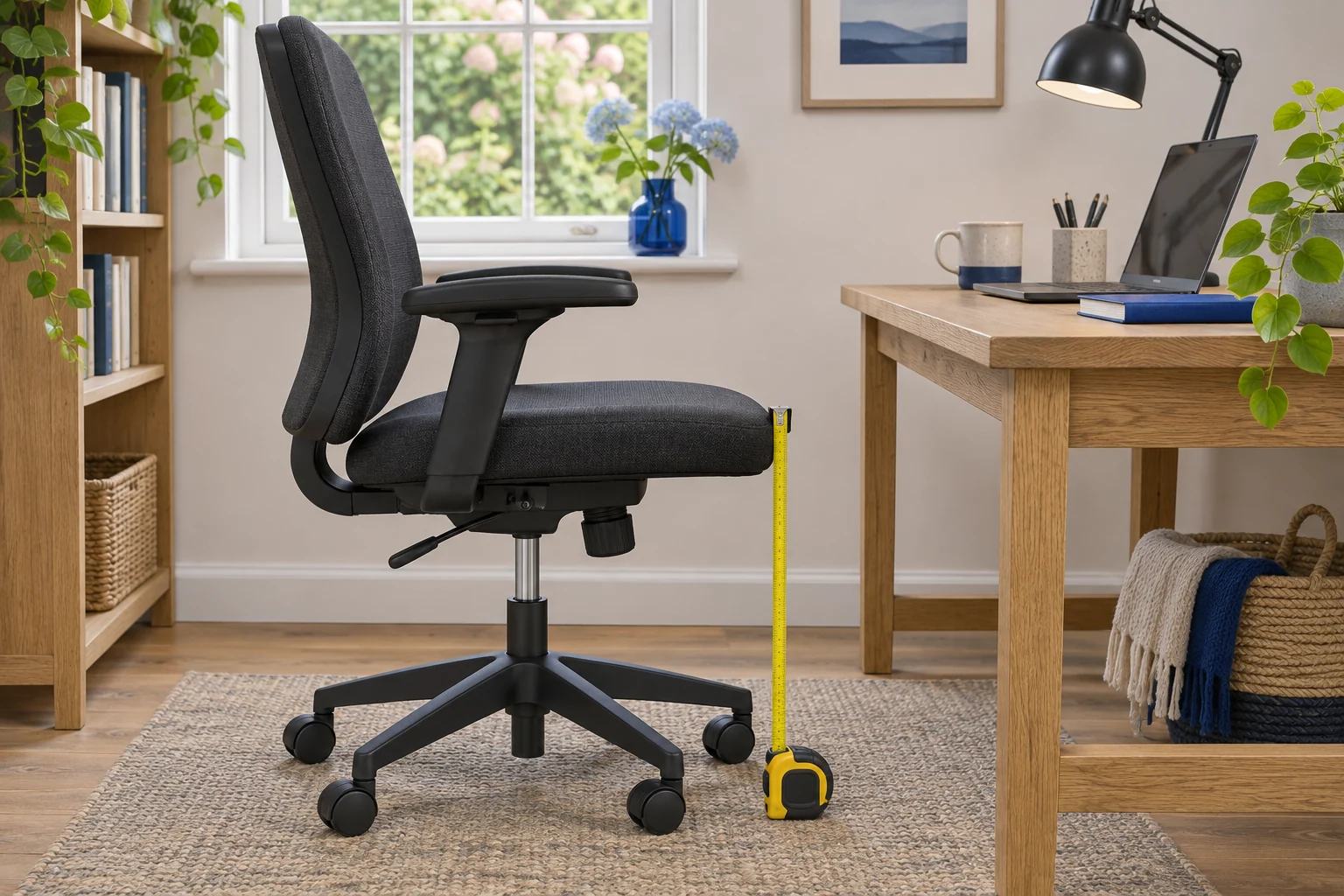
Find your working seat height
Wear the shoes or slippers you normally work in. Sit back so the chair supports you and put both feet on the floor. Lower the seat if you feel pressure at the front of your thighs or find yourself tucking your feet behind the chair base. Raise it a little if you feel cramped and still have room to support your feet comfortably. Use a stable foot platform if the floor is beyond reach.
Ask someone to measure vertically from the finished floor to the cushion beside your thigh while you sit normally. Record the position you used for the measurement. A thick cushion settles under load, and the front edge of a contoured seat can be higher than the surface beneath you. If you work on carpet or a chair mat, take the measurement on that surface.
Then get up and measure the unloaded cushion at the same point. Keep both figures. The seated one tells you how you felt at the desk. The unloaded one gives you a closer reference for a product drawing if the manufacturer measured it the same way.
Read the range against your measurement
A chair advertised at 41–52 cm should give you room to experiment if your measured target is around the middle. If you need a height close to 41 cm, check the reference point and ask to try that exact chair. A replacement castor set can alter the floor-to-seat measurement as well.
The Onyx Steelcase Series 1 is a useful reference for a published 41–52 cm seat-height range and an adjustable seat pan. Changing the depth can make it easier to sit fully back at the height you measured. Check the seat depth separately, since a low chair with a long seat can still press into the back of your knees.
A lower seat with a depth slider
Steelcase Series 1, Onyx
The UK Series 1 specifications list a 41 cm starting seat height and a usable depth range of 42–48 cm. A slider lets you trial the shorter setting.
Steelcase uses a standardised measuring method. Try the seat with your own footwear if you are near the minimum, and check armrest and castor fit at your desk.
- 41–52 cm seat height
- 42–48 cm usable depth
- Depth slider
A target height of 43 cm on a firm trial chair gives you a starting point. On a softer chair, set the gas lift a little higher if the cushion settles lower in use, then check the gap behind your knees and the pressure at the seat edge. Try typing for a few minutes before deciding.
Match the seat to the keys
Sit at the desk and let your shoulders relax. Bring your hands towards the keyboard. If your shoulders rise to reach the keys, first see whether the surface or keyboard position can be lowered. On a fixed top, raising the chair can improve hand position if your feet have support and your thighs still clear the underside.
For example, if you raise the seat 4 cm from a position with both feet on the floor, start by trying a foot support about 4 cm higher. Measure the actual gap under your soles and test whether the platform angle lets both feet settle. The Kensington SoleMate Plus has a published platform-height range of 8.9–12.7 cm, which makes it a candidate for a larger gap. Check the part of the platform your shoes will actually rest on.
A rigid tilting platform
Kensington SoleMate Plus
A rigid platform with a foot-operated adjustment suits a seated setup where you want to change the angle without moving the base.
The listed height is about 9–13 cm. Check the outside base on your floor and measure the part of the tilted platform where your feet actually land.
- 8.9–12.7 cm listed height
- Up to 30° tilt
- Foot-operated adjustment
A footrest also takes up floor space. Slide it where you naturally put your feet and check that the crossbar, chair base and any storage pedestal leave enough room to move. If lifting the seat brings your thighs into a drawer, revisit desk height and the keyboard position.
Record the setting for a shared chair
Write down the seated measurement, the unloaded measurement, the seat-depth position and whether you used a footrest. At a shared desk, record each user’s preferred setting individually and put the note near the height lever or in the desk drawer. Check the parked position too, especially if the armrests travel up with the seat. A chair that works perfectly while you sit can still catch the desk edge when pushed in.
If the footrest is close to your target but its lowest setting is still too high, keep the chair where it works and look for a lower platform. Rest your whole foot on the trial support and try reaching the mouse. If your hips tip back or you slide forward, adjust the platform or the seat before recording a final setting.
Common questions
Where do you measure office chair seat height?
Measure vertically from the finished floor to the seat surface beside your thigh. Keep a note of the point you measured and whether you were sitting on the chair.
Should my feet be flat when I sit at a desk?
Aim for comfortable support for both feet, either on the floor or on a stable platform. Check that the seat edge gives your knees room to move.
Can a footrest make a high chair fit?
It can support your feet if the seat and desk already work together. Check thigh clearance and seat depth at the raised setting.
Does the seat height in a product listing include the cushion?
Use the maker’s dimension drawing to see where it measures. Record a loaded and unloaded height on your current chair so you can compare the right figures.
What if two people need different chair heights?
Find and record a separate setting for each person. Check the chair’s range, the desk underside and any foot support at both settings.
Sources and selection
Sources and Amazon UK listings checked in November 2026. This guide uses published specifications and fitting guidance.