
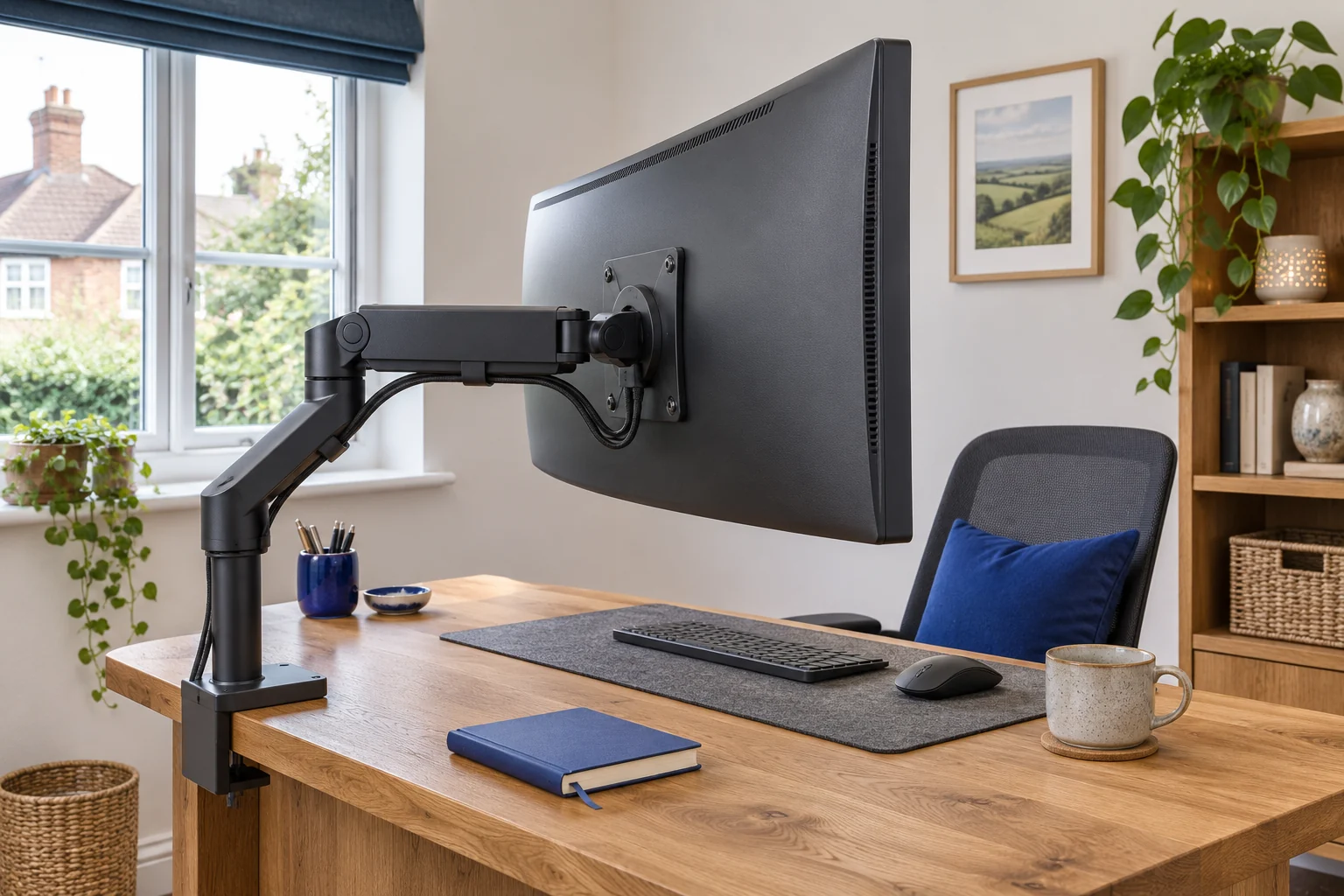
Find the part that moves
With the screen stable and the desk clear, look from the side. Compare the screen angle and the arm elbow with fixed points in the room. If the top edge moves forward while the elbow stays in place, the tilt joint behind the VESA plate is rotating. If the screen stays at the same angle but the elbow drops, the lift mechanism is moving. If the arm base moves against the desk, stop using the mount and follow the manufacturer’s instructions for securing and checking the installation.
Check the cable route as well. A short cable can pull when the screen reaches a particular position. Look for tension near the connector and along the last moving joint. If the monitor cannot hold a safe position, support it as directed by its manual and arrange to return it to its stand while you check the fit. Ask someone to help handle a large display.
The monitor weight guide shows how to find the correct weight without the original stand. Include any mounting adaptor, spacers or accessories that the arm will carry.
Check leverage at the tilt head
The tilt head carries a turning force as well as weight. When the screen’s centre of mass sits farther forward of that hinge, its weight has more leverage. As an illustration, an 8 kg load with a horizontal lever of 6 cm produces about 4.7 N·m. With a 12 cm lever the same load produces about 9.4 N·m. The distances are examples, and the numbers are turning forces from gravity for that position.
The radius marked 1000R or 1800R describes the curve. It gives no direct measurement of the position of the centre of mass. Screen depth, rear housing, the shape of the VESA area and an adaptor that moves the screen forward all affect fit. Ask the arm maker about your exact display model and the plate or adaptor it uses. Check the screen maker’s screw lengths and mounting instructions, especially on a recessed mount.
Check whether the standard pivot is approved
Invision lists the MX450 for 24–40 inch displays and 2–15 kg. Those are useful starting points for a curved display within the range. Send Invision the monitor model, weight without stand, rear depth and VESA detail if the screen is deep or uses an adaptor. Ask which adjustment applies if the tilt drifts.
A larger or heavier screen
Invision MX450
The MX450 handles a wider size and weight range. It is the shortlist option for a compatible display above the MX200’s 9 kg limit, provided the desktop and tilt head can take it.
The longer arm needs room to move. If your screen is deeply curved, ask Invision to confirm the exact model with the tilt head. Check for the 24–40 inch, 2–15 kg revision.
- 24–40″
- 2–15 kg
- VESA 75 × 75 or 100 × 100 mm
Follow the instructions for the exact arm and pivot. Manufacturers can use different fasteners for lift and tilt, and a single generic tightening procedure can be wrong. If an adjustment has reached its limit or the head still drifts, stop using that position and ask the maker to confirm a compatible pivot.
Compare a heavy-duty pivot for a deep screen
The Ergotron HX with HD Pivot in black is model 45-647-224. Its published guidance identifies a 12.7–19.1 kg load range and a display depth range of 15.2–30.4 cm for the HD pivot. Check both figures with the exact display and mounting hardware. Ergotron also offers other HX pivot variants, so look for the model number before ordering.
A specialist deep curved display
Ergotron HX with HD Pivot
A complete HX arm with the heavy-duty tilt pivot for a specific class of heavy, deeply curved ultrawide. Consider it only after matching the exact screen to Ergotron’s compatibility guidance.
The published HD configuration is for 12.7–19.1 kg, 1000R curved displays 15.2–30.4 cm deep, typically up to 49 inches. A lighter flat screen is not an automatic fit. Confirm your exact monitor, adapter and desktop.
- Typically up to 49″; exact model check
- 12.7–19.1 kg in stated curved configuration
- VESA 75 × 75 or 100 × 100 mm
Once a pivot is approved, check the desktop fixing, screen travel and clearance behind the screen. Move the arm slowly through the positions you will use and make sure the cable can reach each one. The ultrawide buying guide compares mounts for different display sizes and room layouts.
Write down the symptoms before asking for support. Include the monitor model, arm and pivot model, any VESA spacer and the arm position where it happens. A short side-on video can show which joint moves and whether cable tension starts just before the drift. Keep the equipment supported while recording.
If the display keeps its angle while the arm drops, follow the monitor-arm sag checks.
Common questions
Why does my curved monitor tilt forward even within the weight limit?
A deep display or spacer can put more leverage on the tilt head. Ask the arm maker whether it supports your exact screen, depth and mounting hardware.
How do I tell tilt drift from arm sag?
Watch the tilt hinge and elbow from the side. A changing screen angle with a steady elbow suggests tilt drift. An elbow that drops while the angle holds points to the lift mechanism.
Does every 1000R monitor need a special pivot?
Check the exact display and arm combination. Curvature, depth, load and the mounting arrangement all matter.
Can I fix tilt drift by tightening the gas spring?
Use the maker’s instructions to identify which part is drifting and which adjustment is intended for it. Ask the maker for help if the approved adjustment fails.
Can a VESA spacer affect tilt?
Yes. A spacer can move the screen forwards and increase leverage. Check both manufacturers’ instructions for the adaptor and screw lengths.
Sources and selection
Sources and Amazon UK listings checked in November 2026. This guide uses published specifications and fitting guidance.