
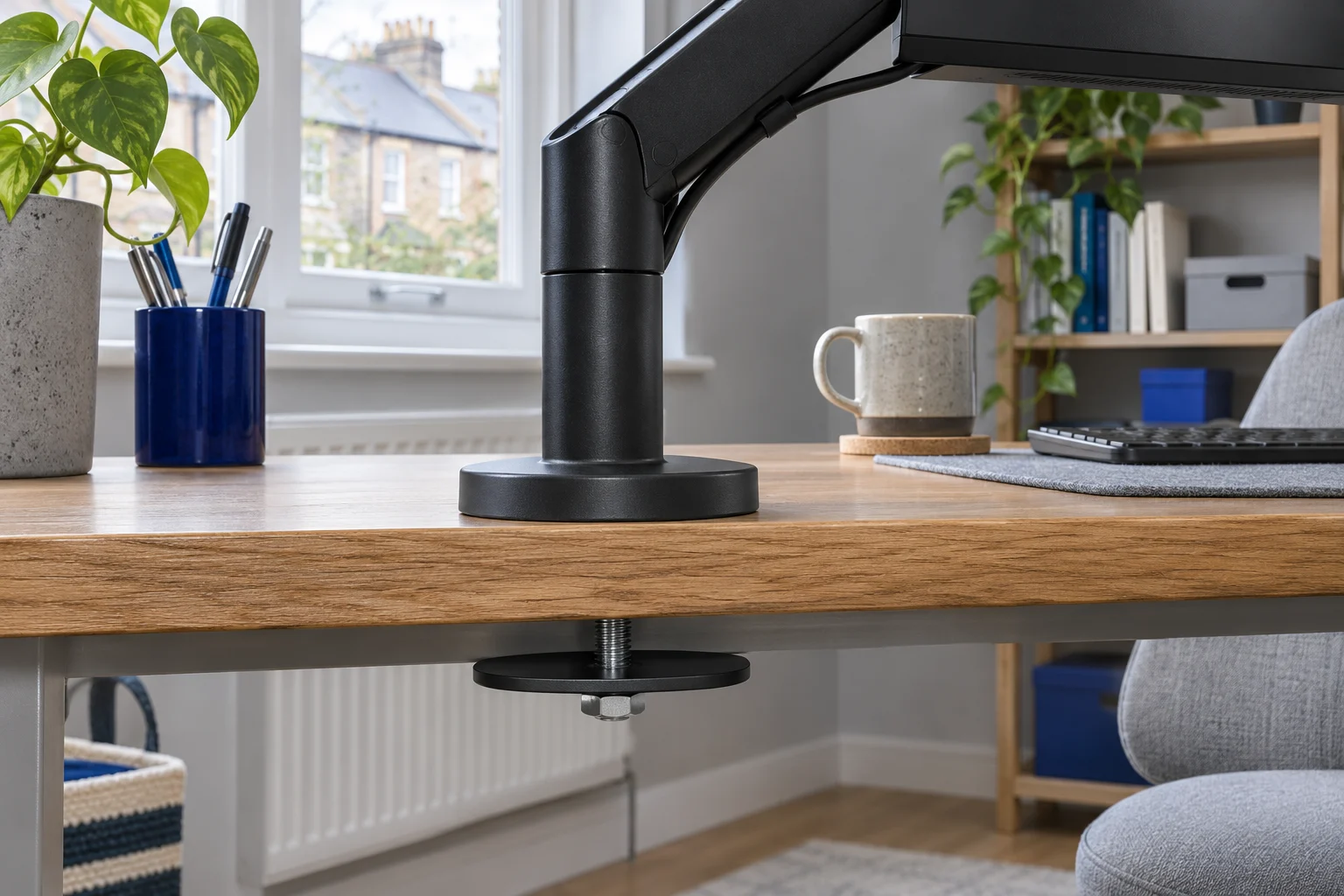
Two ways to attach the same type of load
An edge clamp grips the desktop between upper and lower contact surfaces near its edge. A through-desk or grommet fixing uses a bolt through a permitted hole, with the arm base above and a plate or other specified hardware below. Neither method is universally stronger or suitable for every top. The structure, hardware and installation instructions decide the result.
A through-desk fixing can be useful when a rail blocks access to the rear edge or when the best base position is further into the desktop. It also creates a more fixed attachment location. You cannot slide it along the edge later without using another approved hole.
Scroll across to compare every column.
| Fit question | Edge clamp | Through-desk fixing |
|---|---|---|
| Where does it attach? | At a permitted edge position | At a permitted hole position |
| What space matters below? | Jaw, pressure plate and handle clearance | Lower plate, bolt and tool clearance |
| What dimensions matter? | Bearing thickness and full contact area | Hole diameter, thickness and surrounding bearing area |
| Can the base be moved later? | Often, to another suitable edge position | Only to another suitable hole |
| Is furniture approval needed? | Yes, for the concentrated attachment | Yes, for the hole and concentrated attachment |
An existing cable hole is not automatically a mounting hole
Remove a loose plastic cable insert only as the furniture instructions allow and inspect the construction around the opening. The decorative ring is not the structural surface the mount must bear against. Measure the actual opening and the thickness of the load-bearing panel, then compare them with the exact fixing diagram.
Hole size and shape
The bolt must pass through the opening, while the specified base and lower plate need enough sound material to bear on. An oversized, irregular or damaged cable opening can fail that check even when the bolt fits through it. Use the mount maker’s permitted hole range; do not assume a larger washer makes every opening acceptable.
Position and reach
Check where the arm places the screen when the base sits over the hole. A hole convenient for cables may be too far to one side or too far forward for the desired viewing position. Allow for the full arm sweep, screen casing and plugs, including any nearby wall or shelf.
Access below the hole
A desk can have a clear cable opening above and a metal support directly below. Inspect the entire path and lower bearing area. A drawer, crossmember or cable basket can prevent the lower plate seating or the bolt being secured. The clamp-clearance guide also explains how to photograph and record underside obstructions.
Check which fixing hardware the exact package includes
Invision MX200: two attachment choices to compare
The MX200 provides edge-clamp and through-desk mounting choices for a compatible single screen. Use the fitting diagram for the base supplied and check the through-desk requirements separately from the clamp opening. A quoted clamp range is not necessarily the approved hole or through-desk thickness range.
An everyday adjustable screen
Invision MX200
The gas-assisted arm suits a single compatible screen you move between tasks. It frees the desk from a broad stand and gives you a choice of edge clamp or through-desk fixing.
A centred clamp can leave the elbow in the way of the wall. Check whether the clamp can sit to one side while keeping the screen centred. Match the fitting diagram to the base supplied.
- 19–32″
- 2–9 kg
- VESA 75 × 75 or 100 × 100 mm
VIVO STAND-V001: a mechanical arm with grommet hardware
The V001 also includes a grommet arrangement. Its current manufacturer manual depicts a 10–60 mm hole range. Check the exact revision and remaining thickness and bearing requirements before using an existing hole. The website and manual differ slightly on the clamp maximum, which is another reason to work from the supplied configuration.
Set the height and leave it
VIVO STAND-V001
A mechanical pole arm gives one screen reach and swivel without a gas spring to balance. It suits a working position you adjust occasionally rather than several times a day.
Support the screen before releasing the height collar. The website and manual differ slightly on maximum clamp thickness; confirm your supplied instructions near the limit. Curved screens need model-specific confirmation.
- 13–32″ standard; up to 38″ ultrawide
- Up to 22 lb (about 10 kg)
- VESA 75 × 75 or 100 × 100 mm
Packages differ across the market. For example, the Duronic DM35V2X1 stacked mount uses a separately sold DM-GR-01 grommet kit. Do not assume that an arm described as grommet-compatible contains every part needed in its clamp package. Our stacked-mount comparison identifies that distinction for the vertical pair.
Before making a new hole
Check the exact desk model, panel construction and manufacturer instructions first. Confirm that a new hole is permitted at the proposed position, including the distance from edges and supports. Look for concealed cable routes or mechanisms and ensure the whole fixing can sit on sound material. If the construction is unknown, resolve that before drilling.
Do not drill a glass desktop or an unfamiliar hollow panel as an improvised mounting solution. A solid-looking edge can conceal a different core. Our desktop material guide explains why appearance and overall load ratings are not enough to approve a concentrated fixing.
Keep cables clear of the mounting hardware
If a cable opening becomes a mounting point, check whether the remaining route is still intended to carry cables. Do not trap a lead under the base or lower plate, or feed it against a tightening bolt. Allow proper connector clearance and relaxed movement loops along the arm.
Once the fixing is installed as specified, check the screen at its intended working position and permitted movement extremes. A well-placed bolt cannot compensate for an arm that has insufficient reach or an unsuitable tilt head. If neither clamp nor through-desk fixing is approved, retain the original stand or compare a suitable freestanding mount and its base footprint.
Common questions
Is a grommet mount stronger than a clamp?
Not as a general rule. Both depend on the specified hardware, contact area, desktop structure and installation. Choose the fixing the furniture and mount makers approve for the exact load and position.
Can I use the desk’s cable hole for a monitor arm?
Only if its actual size, surrounding material, position, thickness and underside clearance match the fixing instructions. The plastic cable insert itself is not the bearing structure.
Can I drill a new monitor-arm hole in any wooden-looking desk?
No. A wood-effect surface may cover particleboard, MDF or a hollow core. Identify the construction and obtain the desk maker’s instructions for a hole at the intended position.
Do all clamp arms include a grommet kit?
No. Some include both fixing options and others need a separate compatible kit. Check the exact package and part numbers rather than relying on the word “compatible”.
Can cables share the mounting hole?
Only where the installation instructions allow a clear cable route. Do not trap leads under contact plates or against the bolt, and preserve the required bearing area.
Sources and selection
Specifications and Amazon UK configurations reviewed in November 2026. Recommendations compare published fit information. Check the current listing and instructions supplied with the exact model.